- Batch QR checkout
- Custody and audit trail
- Inspections and certificates
Equipment compliance connected to the people moving the equipment
LiftKept gives equipment owners, warehouse teams and compliance leaders one operational record across rigging lofts, yards, vessels and project sites. Crews move gear quickly; custody, quarantine and inspection rules stay attached to every action.
Built for 100–10,000 individually tagged assets across two or more lofts, yards, or vessels.
Operations
1,284 active assets · 3 lofts · updated 09:41
- Overdue 12 median 3.1 days
- Quarantined 7 4 awaiting review
- Missing 3 oldest 19 days
- Approval blocked 4 oldest 6 hours
- Inspection due 28 9 within 7 days
| Asset | Description | Custody | Custodian | Location | Compliance |
|---|---|---|---|---|---|
| RS-18 | 4.75 t round sling, 3 m | Checked out | J. Okafor | Berth 4 · WA-12 | Compliant |
| BR-29 | 8 t bow shackle | Quarantined | None | QA-01 quarantine | Failed |
| CH-52 | 12 t chain sling, 2-leg | Available | None | Loft A · Bay 3 | Due soon |
| LB-04 | 3.2 t lifting beam | Checked out | M. Halvorsen | Vessel Skua | Compliant |
| LH-21 | 2 t ratchet lever hoist | Missing | None | Unknown | Incomplete |
Running lifting operations at
- Kestrel Rigging
- Halden Offshore
- Tyne Harbour Group
- Brightwater Energy
- Ardmore Industrial
Five questions your equipment register should answer without anyone going to look
Spreadsheets, certificate folders, and the person who has been in the loft longest can usually answer three of these. LiftKept answers all five from one ledger, in real time.
- 01
What equipment exists?
One register, every item individually tagged with an opaque QR identity.
- 02
Where should each item be?
Home loft and current location are held separately, so drift is visible.
- 03
Who is accountable now?
One named custodian per checked-out asset. No shared or anonymous logins.
- 04
Is it safe to use?
Custody and certification are checked independently before anything leaves.
- 05
What history explains it?
An append-only event for every movement, correction, and approval.
In the field
Fast enough that crews actually use it
A rigger in gloves, in bright sun, halfway through a job, will not open a spreadsheet. LiftKept checkout is a camera and a batch list: scan each label, see any block reason on the item itself, choose a work area and due date, confirm once.
- Batch scanning with immediate per-scan feedback and no modal to dismiss.
- Every block reason shown against the item, long before anyone reaches confirm.
- One server-side validation pass: a direct batch commits in full, or it fails and names every blocking item.
- Fully usable at 390 px with 44 px touch targets, and manual entry when the camera fails.
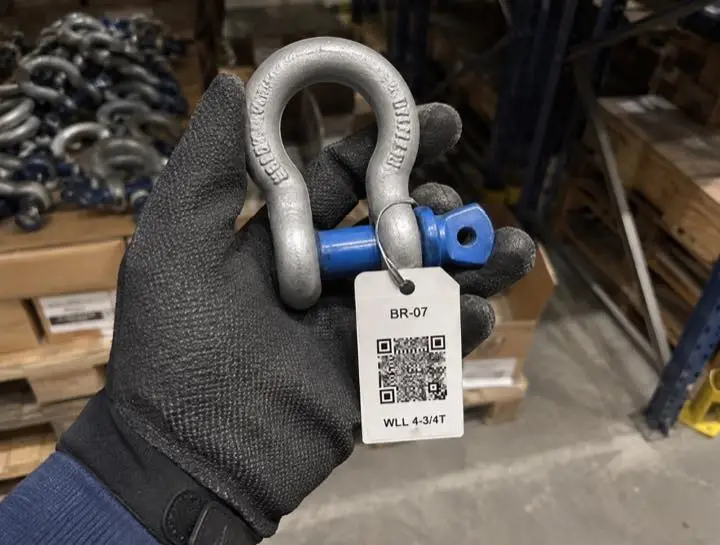 Point the camera at the label
 BR-07 added to batch
- BR-07 4.75 t bow shackle Ready
- RS-11 3 t round sling, 3 m Ready
- CH-52 12 t chain sling, 2-leg Ready
All three are available and in certification.
8 t bow shackle
Checkout blocked — 2 reasons
- Custody state is quarantined Reason on record: visible distortion to the bow. Raised by K. Duarte, 12 Aug 2026.
- Last thorough examination failed Scheme: 6-monthly thorough examination. Recorded 12 Aug 2026 — the fail moved the item straight to quarantine.
Item must be in QA-01 · Aberdeen quarantine cage
Safety floors
The unsafe action is simply not available
Custody and compliance are separate dimensions in LiftKept, and both are evaluated before anything leaves. An item sitting physically in the loft can still be held back because its examination is overdue or its last inspection failed — you set that blocking behaviour per inspection scheme. Quarantine clears custody straight away and names the physical area the item has to go to.
- Five fixed custody states — available, checked out, quarantined, missing, retired. Nobody can invent a sixth.
- Compliance graded separately: not required, compliant, due soon, overdue, failed, or incomplete.
- Quarantine always requires a written reason and a designated, active quarantine area.
- Nobody approves their own request, and approvals are revalidated at the moment of decision.
Configuration
Configurable to your operation, not to the point of breaking the record
Every company runs its loft differently. Build your own roles from a fixed permission catalogue, scope each assignment globally or to one site or loft as far as that permission allows, and decide per workflow whether an action completes directly, needs approval, or is prohibited outright.
What LiftKept will not let an administrator do is switch off the audit trail, share a custody record between two people, or invent a custody state that hides a problem.
When a custodian returns an item to a loft that is not its home loft
Requesters cannot approve their own requests. This cannot be changed.
All sites · policy version 4 · changed by R. Vance, 12 Aug 2026
You configure
- Custom roles built from the permission catalogue
- Global, per-site, or per-loft scope wherever the permission allows it
- Sites, lofts, quarantine areas, work areas, and categories
- Inspection schemes by category or by individual asset
- Approval policy per workflow, checkout durations, and due-date rules
- Notification rules, company branding, and QR label templates
Nobody can switch off
- Tenant isolation between companies
- Append-only audit and administration events
- Exactly one custodian on a checked-out asset
- A written reason on every correction and status change
- The block on approving your own request
- The last recoverable company administrator
Evidence
Reconstruct any item’s history without opening a single spreadsheet
Every movement and correction writes an append-only event in the same transaction that changes the asset, and an approval request records itself without touching the asset until someone decides. Corrections do not overwrite anything — they add a linked record that names what it corrects and why.
- 23 Aug 2026 · 09:14 Checked out J. Okafor took custody. Loft A → Berth 4 · WA-12.
- 21 Aug 2026 · 16:02 Released S. Adeyemi released the item from quarantine to Loft A · Bay 3.
- 18 Aug 2026 · 07:48 Correction R. Vance changed the category from Slings to Round slings.
- 17 Aug 2026 · 13:31 Quarantined M. Halvorsen moved the item to QA-01 · Aberdeen quarantine cage.
- 02 Aug 2026 · 08:00 Registered Imported by R. Vance in batch IMP-0031 and assigned a QR identity.
No event on this timeline can be edited or deleted, by anyone, including a company administrator.
Inspection records structured for the examination regimes your team already works to
- LOLER 1998
- PUWER 1998
- EN 13414
- ASME B30
- DNV-ST-E273
- ISO 9001:2015
Inspection schemes are configured per category or per asset, so the intervals and fields match the regime you are audited against.
See it running against your own register
Send a slice of your current equipment list. We load it, set up one site, one loft, and a quarantine area, then walk your team through a checkout, a quarantine, and an audit export. About thirty minutes.
or email try@liftkept.com